Spring Boot Reactive JWT

🍃 Spring Boot Reactive With JWT Authetnication System
Agenda
In this blog post, we’ll explore how to implement JWT authentication and authorization in a reactive way using the Spring Boot Reactive framework. 😃
Assuming you’re already familiar with implementing JWT authentication in a normal Spring Boot application, this blog will focus on the key differences in the implementation for a reactive application.
Before we dive into the implementation details, let’s quickly review what reactive programming is, what the Spring Boot Reactive framework is, and what JWT authentication is.
What is reactive programming?
Reactive programming is a paradigm built on the concept of streams, where data flows asynchronously between components. In this programming model, a client sends a request to the server, and the server responds with a stream of data that’s pushed to the client as it becomes available. This approach enables more efficient use of resources, as opposed to the traditional model where a request blocks certain portions of resources until the request is fulfilled.
What is Spring Boot Reactive Framework? 🔋
Spring Boot Reactive is a implementation of the reactive programming paradigm into web framework which makes it easy to create stand-alone, production-grade applications, and the Reactive Streams API, which enables asynchronous, non-blocking communication between components in the application.
What is JWT Authentication System? 🔐
JWT (JSON Web Token) is a standard for securely transmitting information between parties as a JSON object. JWT Authentication is a token-based authentication mechanism that involves the use of JWT to authenticate users.
In JWT Authentication, when a user logs in to an application, the server generates a token. This token is then sent to the client and is used for subsequent requests to the server to prove the user’s identity. The server then verifies the token and allows or denies access to the requested resource based on the information contained in the token.
Benefits of using Reactive API
- It allowes asynchronous and non-blocking communication between components, which helps to reduce latency and increase responsiveness.
- Improve performance by reducing the amount of blocking and increasing the parallel processing of requests.
- It provides a solid foundation for building scalable and resilient web applications.
Dependency Needed to Follow Along
These are the following dependency needed for the application which we are going to build.
- JDK 17
- Maven build tool
- An IDE (Intellij or Visual Studio Code)
- MongoDB (I will be running inside docker)
🔖 Link to the project github repo is in the bottom.
Let’s Code Along 🚀
First of all we need a working mongodb database for the application to work with. Because the application will store user information into the the database and interact with it.
Assuming you know how to use Docker use this following docker-compose file to create a mongodb instance.
version: "3"

services:
  mongo:
    image: mongo:6.0.2
    container_name: mongodb6
    restart: on-failure
    ports:
      - 37017:27017
This will spin up a mongodb instance inside docker container and expose port 37017 into host.
application.yaml file)Initialize the Project
Head over to Spring Initializr and generate a project template with the following dependencies.
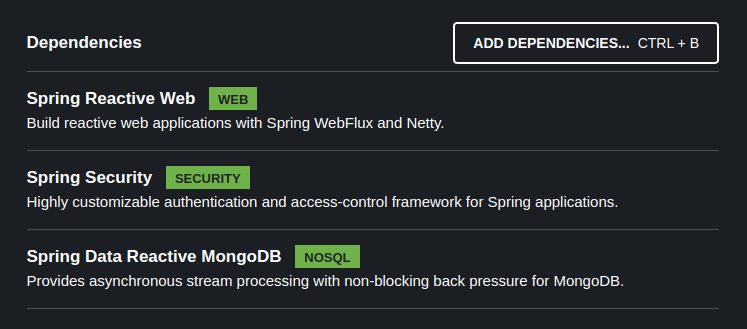
Add java-jwt dependency as Additional dependencies needed for the application to work with Jeson Web Tokens (JWT)
<dependency>
    <groupId>com.auth0</groupId>
    <artifactId>java-jwt</artifactId>
    <version>4.2.2</version>
</dependency>
Domains
Our project will be a simple poc project so we will only have single domain in it named Account.
@Document
public class Account implements Serializable {

    @Id
    @MongoId
    private ObjectId uid;

    @Indexed(unique = true)
    private String email;

    @NotEmpty
    private String password;

    @NotEmpty
    private Set<Roles> roles;

// getters, setters, equals, hash and other helper methods are removed for brevity
}

public enum Roles {
    ROLE_ADMIN,
    ROLE_USER
}
Repository
@Repository
public interface AccountRepository extends ReactiveMongoRepository<Account, ObjectId> {

    Mono<Account> findByEmail(String email);
}
Authentication Filter
Create a JWTAuthenticationFilter.java class file which will be used to authenticate and validate user with their JWT token and initialize security context for a request lifecycle in the server.
If you don’t know what is the role of a filter in spring lifecycle you can see them as guard of a server blocking and filter every request that are processed in the server.
public class JWTAuthenticationFilter implements WebFilter {

    public static final String HEADER_PREFIX = "Bearer ";

    private final AuthService authService;

    public JWTAuthenticationFilter(AuthService authService) {
        this.authService = authService;
    }

    @Override
    public Mono<Void> filter(ServerWebExchange exchange, WebFilterChain chain) {
        String token = resolveToken(exchange.getRequest());
        if (StringUtils.hasText(token)) {
            return authService.verifyJWT(token)
                    .map(account -> new UsernamePasswordAuthenticationToken(account, null, account.getGrantedAuthorities()))
                    .flatMap(authToken -> chain.filter(exchange)
                            .contextWrite(ReactiveSecurityContextHolder.withAuthentication(authToken)));

        }

        return chain.filter(exchange);
    }

    private String resolveToken(ServerHttpRequest request) {
        String bearerToken = request.getHeaders().getFirst(HttpHeaders.AUTHORIZATION);
        if (StringUtils.hasText(bearerToken) && bearerToken.startsWith(HEADER_PREFIX)) {
            return bearerToken.substring(7);
        }
        return null;
    }
}
Security Configuration
Create a class SecurityConfig.java configuration bean and declare 3 beans inside the class
1. PasswordEncoder Bean:
The bean which will be responsible for encoding and comparing raw passwords with the encrypted password. This will ensure even if our application and database gets compromised hacker won’t be able to see user’s passwords.
2. UserDetailsService Bean:
User details service bean will provide the implementation by which spring security will be able to retrive user information from database during the authentication process.
3. SecurityWebFilterChain Bean:
This is a security filter chain bean which will expose all security configuration of the server. We can also set the authorization rules of api endpoints from here.
@Configuration
@EnableWebFluxSecurity
public class SecurityConfig {

    private final AccountRepository accountRepository;

    @Autowired
    public SecurityConfig(AccountRepository accountRepository) {
        this.accountRepository = accountRepository;
    }

    @Bean
    public PasswordEncoder passwordEncoder() {
        return new BCryptPasswordEncoder();
    }

    @Bean
    public ReactiveUserDetailsService userDetailsService() {
        return username -> accountRepository.findByEmail(username)
                .map(account -> new User(account.getEmail(), account.getPassword(), account.getGrantedAuthorities()));
    }

    @Bean
    public SecurityWebFilterChain securityFilterChain(ServerHttpSecurity http, AuthService authService) {
        return http.csrf(ServerHttpSecurity.CsrfSpec::disable) // disabled for stateless server configuration
                .httpBasic(httpBasicSpec ->
                        // any kind of authentication exception will return 401 response
                        httpBasicSpec.authenticationEntryPoint(new HttpStatusServerEntryPoint(HttpStatus.UNAUTHORIZED))
                )
                .authorizeExchange(exchange -> exchange.pathMatchers("/api/admin/**").hasRole("ADMIN")
                        .pathMatchers("/api/auth/**").permitAll()
                        .anyExchange().authenticated())
                .addFilterAt(new JWTAuthenticationFilter(authService), SecurityWebFiltersOrder.HTTP_BASIC)
                .build();
    }
Notice that we are using the JWTAuthenticationFilter we created earlier to replace HTTP_BASIC authentication filter.
@EnableWebFluxSecurity annotation in the bean class your security filter won’t take effect at all. This annotation is necessary to initialize the security filter chian for spring boot reactive.Project Link
You can find the full source code of the project in my github repository. Here is the link https://github.com/T4puSD/reactive-spring-rest-jwt
Conclusion
In this blog post, we’ve explored what is Reactive Programming, what is JWT and how we can use it to secure a web application, and learned how to implement Spring Boot Security in a reactive paradigm. While Spring Boot is designed for traditional request/response web applications, Spring Reactive allows you to build more efficient and scalable reactive web applications. With the Spring Security Reactive module, you can easily secure your reactive endpoints and ensure that your application is safe and secure.